Describe the image. Keep the meaning.
Upload a photo, chart or screenshot and AltKit writes alt text for social posts that reads the words in it.
Try the generator
With an account you can also add context and terms, such as where the image will appear or who is in it.
From image to alt text in three steps.
Add a photo, chart or screenshot, optionally add your own context, and copy the description into your post or page.
Add an image
Drag it in or pick a file: PNG, JPEG, WebP, GIF or AVIF.
Give it context
With an account, add a line about where the image goes or who is in it, and terms such as a product or place name.
Copy the result
Paste it into the alt text field where the image is published. With an account it is saved to your library too.

Context
Shibuya Crossing, Tokyo
Alt text
Hundreds of people cross Shibuya Crossing in Tokyo, seen from high above on a sunny day. They walk in every direction over the wide white zebra stripes, many carrying shopping bags, and each casts a long diagonal shadow across the grey asphalt. One person holds a white umbrella.
Reads the words inside the picture.
Charts, screenshots and quote cards carry their meaning in text. AltKit works that text into the description, so a screen reader user hears the numbers and the words, not only that there is a chart.
Charts and graphs
The title, the labels and the values that carry the point.
Screenshots
Interface text, messages and notices, quoted where they matter.
Quote cards and signs
The words themselves and who they are from.
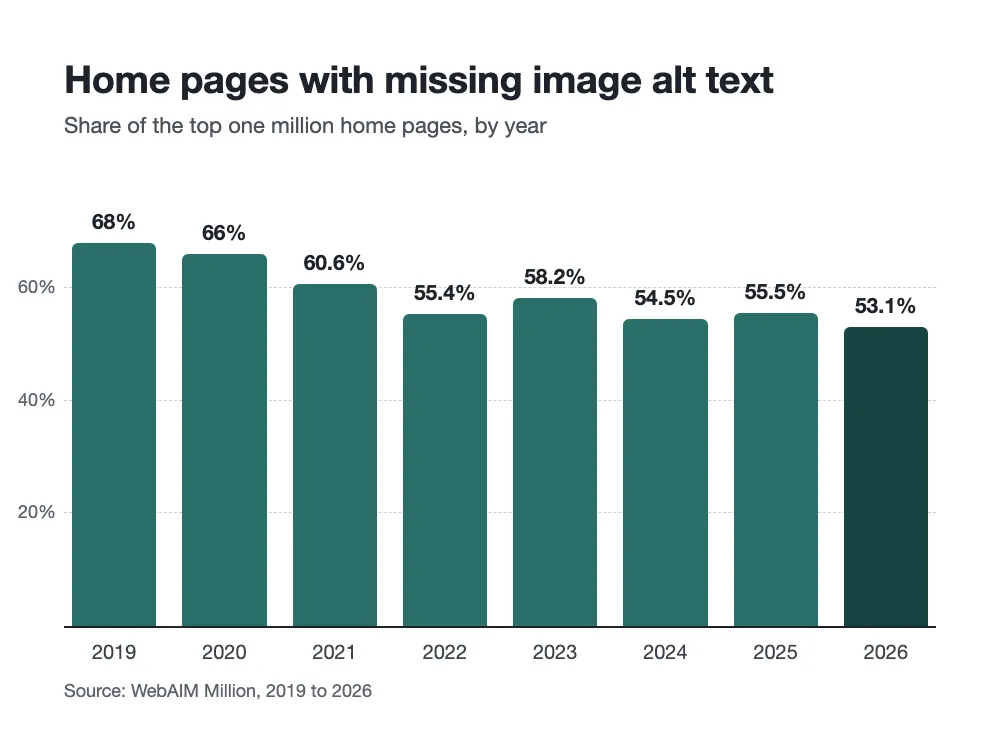
Chart
Bar chart titled “Home pages with missing image alt text”, from the WebAIM Million. The share of the top one million home pages missing alt text falls from 68% in 2019 to 53.1% in 2026, its lowest point, despite rises in 2023, to 58.2%, and in 2025.
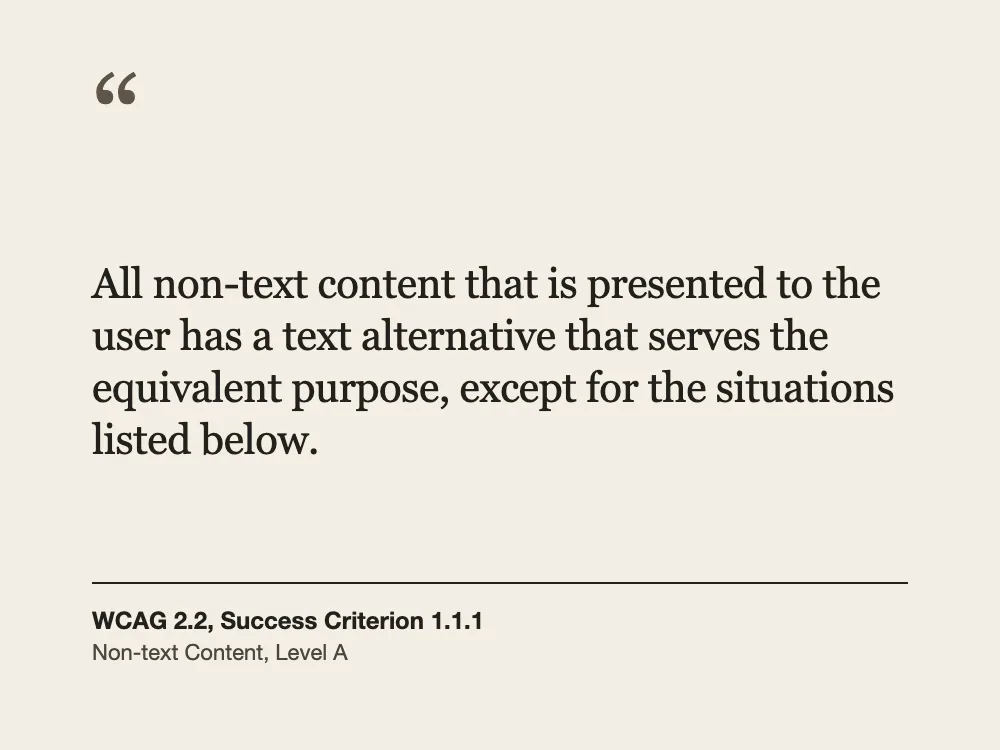
Quote card
Quote card on a cream background: “All non-text content that is presented to the user has a text alternative that serves the equivalent purpose, except for the situations listed below.” Attributed to WCAG 2.2, Success Criterion 1.1.1, Non-text Content, Level A.
Write alt text where you post.
The extension adds a Create Alt Text button to the alt text dialog on the sites below. One click writes the description into the field.
Works in the alt text dialog on
- Bluesky
- X
- Mastodon
- Deer.social
 Add to Chrome
  Add to Edge
  Add to Firefox
 Works where you post

Bluesky 
X 
Mastodon 
Deer.social 
LinkedIn 
Instagram 
Facebook
Photos from Unsplash. See credits
Free to use. No plans, no card.
A free account gets 100 images a day. With your own API key, the extension has no daily limit.
Without an account
Try 2 images in the generator on this page.
With a free account
100 images a day, with context, terms and a library.
With your own API key
No daily limit in the extension. The image goes from your browser to the provider you choose, and their charges apply.
AltKit is free. If it helps you, you can buy me a coffee.
 (opens in a new tab)
Questions, answered.
Something else? Write to support.
- Is AltKit free?
- Yes. A free account gets 100 images a day. With your own API key in the extension there is no daily limit, and your provider charges you directly.
- Are my images stored?
- No. AltKit uses your image only to write the description and does not keep it. If you turn on library previews in your account, a small preview is kept until you delete it. With your own API key in the extension, the image goes from your browser to your provider and AltKit receives nothing. Your images are never sold or shared for advertising.
- Does it read text in screenshots and charts?
- Yes. Text that carries the meaning, such as a sign, a chart label or a headline, is read and quoted. A long post or article is summarised: who wrote it, where, and what it says, rather than every word.
- Where is my alt text saved?
- With an account, every description is saved to your library, where you can search it, copy it again or delete it. Without an account there is no library.
- Which sites does the extension work on?
- The alt text dialogs on Bluesky, X, Mastodon, Deer.social, LinkedIn, Instagram, Facebook.
- Which browsers are supported?
- The extension is available for Chrome, Edge and Firefox.
Give every image the words it needs.
Try two images in the generator above, or create a free account for 100 images a day.